Reporting and Being Reported
The forum's moderation works because users report bad behavior. It works well because the reports come with evidence. Here's how to use the system responsibly — both as reporter and reportee.
How to report
Every post has a "Report to moderator" link. Use it when:
- A user is spamming
- A post is promoting a scam
- A user is harassing or threatening
- Plagiarism is suspected (link the original source)
- Wrong-board posting is repeated after warnings

Every post carries a 'Report to moderator' link at its bottom right — reporting is one click plus a short reason, and it goes only to the moderators, not into the thread.
Bitcointalk screenshot · Another member's post: the username and post text are solid bars flattened into the image; the red outline is the operator's.
What makes a useful report:
Do
- Link directly to the offending post
- State the specific rule being broken
- Provide evidence (links to plagiarism source, scam threads, etc.)
- Keep the tone factual — no editorializing
Don't
- Report disagreements as 'harassment'
- Report posts you simply dislike
- Mass-report a user out of spite
- Use vague accusations without evidence
Mods see your report queue and your prior report history. Frivolous reporters lose credibility quickly.
What mods see when you report
A moderator opens the report and sees:
- The reported post
- The reporter's username + report history
- The reportee's recent post history
- Any prior warnings or bans
A pattern report from a credible user gets acted on within hours. A pattern of false reports gets the reporter warned.
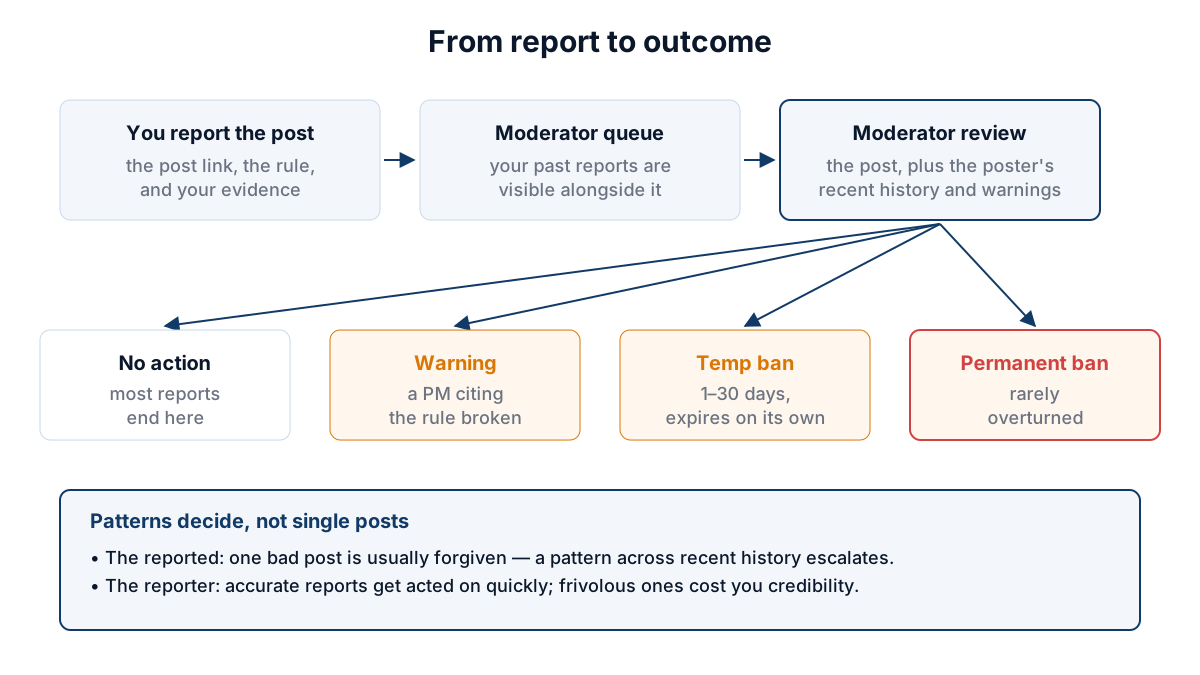
A report is judged on patterns — the poster's recent history and the reporter's track record — and outcomes escalate from no action through warning and temp ban to permaban.
Academy original
If you're reported
Don't panic. Most reports don't result in action.
If a mod does take action, you'll see:
- A PM with the rule cited
- Sometimes a temp ban (your account can read but not post)
- Rarely, a permanent ban (escalation after warnings)
Your options:
- Wait it out. Temp bans expire on their own.
- Reply via PM. Mods read PMs. Calm, factual, brief replies sometimes get warnings reduced.
- Appeal in Meta. For perceived unfair bans, post in the Meta board. theymos and other staff read it.
False reports against you
If someone is mass-reporting you in bad faith:
- Don't escalate publicly
- PM a global moderator (Mitchell, hilariousandco, others) with the pattern
- Provide the reporter's username and the post URLs they reported
- Mods can see the report queue and will act on bad-faith reporting
The community defense
The forum's defenses are mostly user-run, not staff-run. theymos and the few mods can't read 100K posts a day. They rely on:
- Community reports
- Trust system feedback
- Plagiarism trackers
- Reputation board threads
When you participate constructively in any of these, you're doing moderation work the forum couldn't do without you.